Insurance renewal reminder
Insurance, nominees and important papers.
Policies, renewal dates and nominees where you can find them. No digging through emails.
Short answer
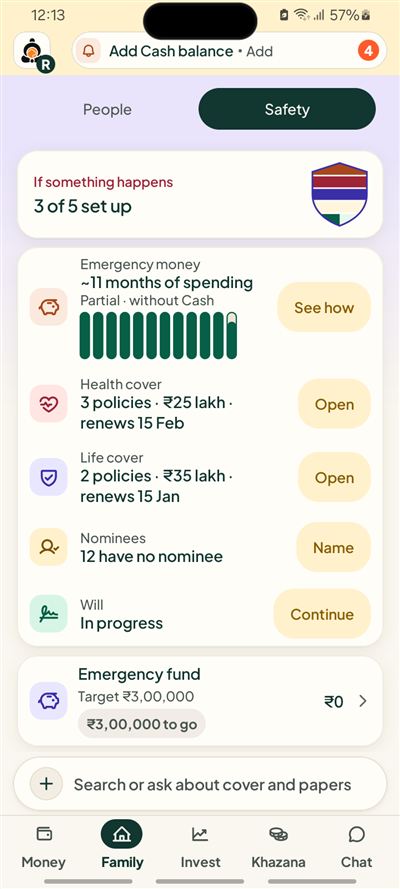
Kubear stores your policy details: who is insured, cover amount, premium, renewal date and nominee. It shows which policies have no nominee recorded, keeps a checklist of important papers, and offers a simple will maker.
What do I record for a policy?
The insurer, the person insured, the cover amount, the premium, the renewal date and the nominee. Add a policy document and Kubear reads the premium, cover and due date into a draft. You edit it and confirm before it is saved.
How do renewal dates help?
Each policy shows its renewal date. A health policy renewing on 15 February, or a term policy on 15 January, shows in Chat with the days left before it falls due, and the premium counts among your bills. You can switch on reminders if you want them.
What about nominees?
The Safety page counts the items that have no nominee recorded. It is only a fact on a list: "no nominee added". It does not say who your nominee should be.
What are important papers?
A place for the papers a family may need to find, such as PAN, Aadhaar, policies, property, tax and bank papers, so they live in one place instead of many. A family pack also shows how many accounts have a nominee.
What is the will maker?
An optional guided form. You answer questions about the people, gifts, executor and witnesses, and Kubear puts your answers into a fixed template as a PDF made on your phone. You print it and sign it with witnesses. It is a template, not legal advice, and Kubear is not a law firm.
Does Kubear say how much cover I need?
No. Kubear shows the cover you have recorded. It does not say whether it is enough, and it does not suggest any policy.
Why keep this in one place?
Policy details are the kind of thing a family needs in a hurry and cannot find. Which company, which policy number, who the nominee is, when it renews. Having them in one list, with dates, means a spouse or parent can look instead of searching through old mail.
Who can see my policies?
Your policies are Personal and private by default. They are visible to others only if you put them in a shared household space.
A worked example
Say you add a health policy for your mother: cover ₹5,00,000, premium ₹14,200, renewing on 15 February, nominee not yet added. The list shows it with its renewal date and the days left. The protection area shows which policies have no nominee recorded, so this one appears there until you add a name.
Can I attach the policy papers?
Yes. You can add the policy papers to the policy, so the document sits next to the dates and amounts. You can also add a photo or file of a policy. Kubear reads it into a draft, and you check every detail before it is saved.
How do I keep dates current?
When you renew, change the renewal date and premium on the policy. Nothing updates on its own, so the list always shows what you last recorded, with the date you recorded it.
At a glance
Cover and renewals
Amount, premium and the date it renews.
Nominee facts
Which policies show no nominee yet.
Papers and will
A checklist and a simple will template.
Related