Budget app, India
Monthly budget planner. Limits you can see.
One month on one screen: money in, money spent, bills left, and what is left to spend.
Short answer
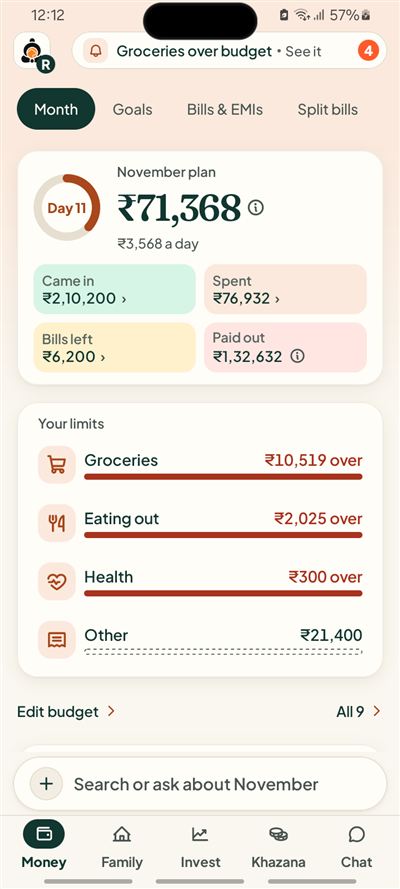
Kubear is a budget app for Android. Its Month view shows income received, spending so far, bills still due and what is left, with a limit for each category. A limit that is crossed shows as a negative number. It is never rounded up to zero.
How does budgeting work in the app?
You set a monthly limit for the categories you care about, in rupees. Every spend you save counts against its category, every bill you mark paid moves out of bills left, and the month works out what is left from those records. There is no separate budget sheet to keep in step.
What does the Month view show?
The first card shows what is left for the month, and what that comes to per day. Under it sit four tiles: money that came in, money spent, bills left to pay, and money already paid out.
Everything is worked out from what you recorded. If something is missing, such as no income recorded yet, Kubear says so instead of showing a made-up zero.
How do category limits work?
A limit is a monthly amount you set for a category, for example ₹8,000 for Groceries. As you save spends, the bar fills. If Groceries reaches ₹10,519 against ₹8,000, the screen shows the real gap, ₹2,519 over, in red.
The limits are yours. Kubear can show you a draft built only from your past spending, but nothing is locked in until you look at it and confirm it. You can edit a limit at any time.
What counts as spending and what does not?
Moving money between your own accounts is not spending, so it does not change your totals. A refund goes back against the category it came from. A bill you have not paid yet counts as a bill left, not as money spent.
Does it tell me what to cut?
No. Kubear shows facts: what you set, what you spent and the difference. It does not tell you what to buy, cut or skip. The choices stay with you.
A worked example
Say ₹60,000 came in this month and you have spent ₹28,000 so far. Bills still due add up to ₹6,200. What is left to spend is ₹60,000 minus ₹28,000 minus ₹6,200, which is ₹25,800. With 20 days to go, that comes to ₹1,290 a day.
Kubear does this sum for you and shows the parts, so you can see which number to change if the result surprises you.
How do category limits look in the middle of a month?
Sana Qureshi in Pune takes home ₹48,000. On the 18th, her bills for the month are rent ₹15,000, electricity ₹2,352, broadband ₹799 and a mobile plan ₹349: 15,000 + 2,352 + 799 + 349 = ₹18,500.
| Category | Limit | Spent | Left or over |
|---|---|---|---|
| Groceries | ₹6,000 | ₹5,200 | ₹800 left |
| Swiggy and eating out | ₹2,500 | ₹2,900 | ₹400 over |
| Travel | ₹2,500 | ₹1,600 | ₹900 left |
| Shopping | ₹3,000 | ₹3,100 | ₹100 over |
| Total | ₹14,000 | ₹12,800 | ₹1,200 left |
Check: 800 − 400 + 900 − 100 = ₹1,200, which equals 14,000 − 12,800. What is left of income is 48,000 − 18,500 − 12,800 = ₹16,700. The two categories over their limits show the amount over. Nothing is rounded to zero, and the app redoes these sums on every saved entry.
How is it different from a spreadsheet?
A spreadsheet needs you to enter every figure and keep the formulas right. In Kubear the figures come from the spends, bills and income you already saved, so the month updates by itself. There is no formula to break, and every total opens to the entries behind it.
At a glance
Left this month
One number, plus what it comes to per day.
Category limits
Set in rupees. Overspend shows as a real negative.
You confirm
A drafted budget is yours only after you lock it.
Related