EMI tracker and bills
EMI tracker and monthly bill organizer.
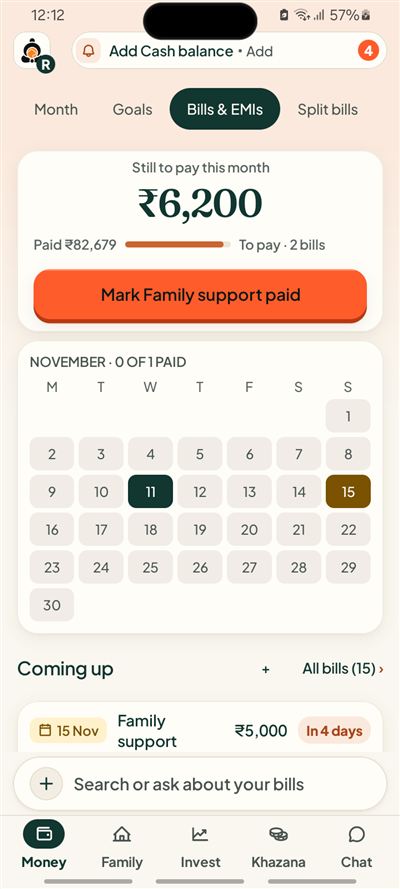
Every due date on one calendar, with the total still to pay this month.
Short answer
Kubear is an EMI tracker and monthly bill organizer for Android. It keeps your bills, EMIs and subscriptions in one Bills and EMIs calendar. It shows how much is still to pay this month, which bills are coming up, and lets you mark one paid when you have paid it.
What can I put on the calendar?
Add anything that repeats or falls due: a home loan EMI, a phone bill, rent, a streaming subscription, a credit card payment. Give each one an amount, a due date and how often it comes round, such as monthly or yearly.
Say your EMI is ₹12,400 on the 5th and rent is ₹18,000 on the 1st. Both show on their dates, and the month adds them up for you.
How do I know what is still to pay?
The first card shows what is still to pay this month and how many bills that is, for example ₹6,200 across 2 bills. A bar shows how much you have already paid. Below the calendar, a Coming up list shows the next bills with the days left.
What happens when I pay a bill?
Tap Mark paid and confirm. For an EMI, you record the payment instead. The bill moves from still to pay to paid out, and your month updates. Nothing is saved until you confirm.
How does it track an EMI?
Add the loan EMI with its amount and due date, say ₹12,400 on the 5th. It sits on the calendar each month. When it is paid, you record the payment and confirm, and the EMI moves from still to pay to paid out for that month.
Does a subscription count as spending?
A subscription is a commitment: a plan for money that is due. It becomes spending only when you record that it was paid. This keeps your month honest, because a bill that has not been paid has not left your account.
Can I get reminders?
Reminders are off until you turn them on. When you do, the phone asks for permission once. Kubear keeps them few and gives no amounts on the lock screen.
An example month
Take a month with rent of ₹18,000 on the 1st, an EMI of ₹12,400 on the 5th, a ₹499 streaming plan on the 11th and ₹5,000 for family support on the 15th. The calendar marks all four dates. By the 12th, the first three are paid, and still to pay shows ₹5,000 for one bill.
Because the amounts sit beside the dates, you can see which days of the month are heavy before they arrive.
What about a bill I forgot to add?
You can add it at any time, with its amount and due date. If it is already overdue, it shows as due. Nothing about the past is changed unless you change it.
At a glance
One calendar
Bills, EMIs and subscriptions together.
Still to pay
The month total and the bills behind it.
Reminders you choose
Off until you switch them on.
Related