Expense tracker app, India
Expense tracker. Just type it.
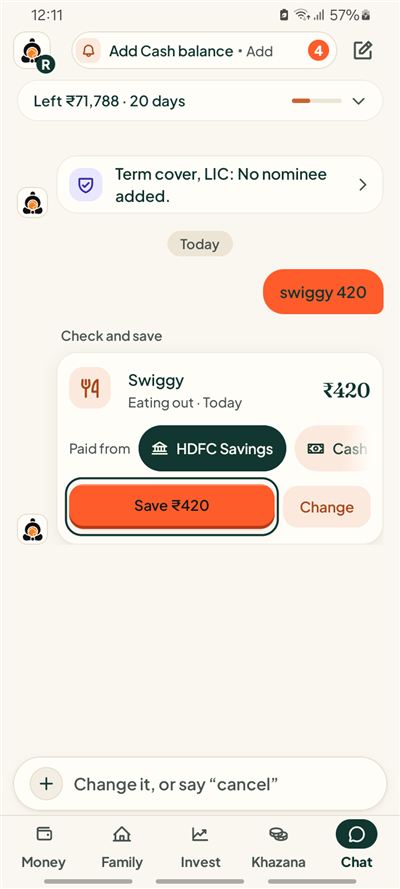
Type "Swiggy 420" like a message. Kubear reads it, shows you a card, and saves only when you say so.
Short answer
Kubear is an expense tracker app for day to day expenses, on Android. You type a spend in plain words, check the amount, category and account on a card, and tap Save. Nothing goes into your records without that tap.
How does Kubear record a spend?
Open Chat and type what you spent, the way you would text a friend. "Swiggy 420", "auto 80" or "petrol 1,200" all work. Kubear turns the line into a card with the name, the amount, a category such as Eating out, the date, and the account you paid from.
You then pick one of two buttons. Save puts the spend in your month. Change lets you fix the amount, category or account first. If the card is wrong, say "cancel" and nothing is recorded.
What if I only have a bank statement or a screenshot?
You can add a bank statement or a payment screenshot. Kubear reads it and builds a draft list of spends. You see every line, change what is off, untick what you do not want, and confirm. Only then do the lines enter your records.
A line you already saved starts unticked, so the same spend is not added twice when two statements overlap.
How does a month of spending look?
Your Month view adds spends up by category. Say you spent ₹420 on Swiggy, ₹216 on an Uber and ₹1,200 on petrol this week. Eating out and Transport each show their own total, and the month shows what you have spent so far next to what came in.
Every number opens to the entries behind it, so you can check where a total came from.
Can I ask questions about my spends?
Yes. You can ask in plain words, such as "how much did I spend on eating out in October?". The answer comes only from your own records. To answer, your question and the records it needs are sent to an AI provider. Kubear shows the answer as facts and sums, not as advice.
What about my data?
There are no ads in Kubear and we do not sell your data. You can export your records or delete your account whenever you like, from inside the app. Kubear is for Android.
Why type instead of fill in a form?
A form asks for an amount, a date, a category, an account and a note before you can save. Most people stop after a week. A typed line has the same facts in four words. Kubear fills in the date as today, guesses the category from the name, and offers the accounts you have added. You fix only what is wrong.
That is the whole idea: the less effort a spend takes, the more of your month ends up recorded. And when the records are complete, the totals mean something. Some people call this an expenditure tracker. The job is the same: every rupee that leaves, with its date, category and account.
Which accounts can I pick?
Each card has a Paid from row. Add your savings account, your credit card and cash once, and choose between them as you go. A spend on a credit card is shown against the card, so what you owe stays visible next to what you spent.
At a glance
Type, review, save
A spend becomes a card first. You decide when it is saved.
Statements and screenshots
Added as a draft. You check each line before it counts.
Ask your own records
Plain questions, answered from what you saved.
Related